
Quick answer: Your AI visibility usually drops weeks before Google Search Console or your rankings show it, because citation data from ChatGPT, Perplexity, and AI Overviews lags behind real-time changes in how those tools read your content. Watch four early indicators — falling impressions on previously-cited queries, fewer branded or long-tail mentions showing up when you manually test prompts, content going stale past 60-90 days, and topic drift away from your core expertise — and you can catch a decline before it shows up as lost traffic.
Key takeaways
- Google Search Console reports impressions and clicks with a reporting delay of a few days, per Google's own documentation, and AI platforms publish no official citation dashboard at all — so by the time you see a drop, it's already old news.
- A query that generated impressions for 10+ straight weeks and then goes quiet for two weeks in a row is a stronger signal than one bad day.
- Manually testing the same 10-15 prompts against ChatGPT, Perplexity, and Google's AI Overviews once a month is the closest thing to a free monitoring tool right now.
- Content older than 90 days without a date, stat, or example update is the single most common reason a page quietly loses its citation slot.
Why the Data You're Looking at Is Always Old News
Nothing you check today reflects today. Google Search Console's own help documentation explains that performance data can take a few days to populate and is not real-time — so a ranking change on Monday might not show in your reports until Wednesday or later.
AI platforms are worse. Neither OpenAI, Perplexity, nor Google publishes a citation log that tells you which of your pages got referenced in an answer, when, or how often. There's no dashboard equivalent to Search Console for "did ChatGPT quote my blog this week." You find out only by asking the tools yourself, or by watching your organic traffic shift.
This lag matters because it means the signals most business owners rely on — a dip in visits, a drop in a keyword's position — are lagging indicators. They tell you something already broke. By the time traffic confirms it, you've likely lost weeks of visibility you can't get back retroactively, even if you fix the underlying issue today.
The fix isn't a better dashboard — none exists yet for AI citations specifically. It's learning to read the leading indicators that move before the lagging ones do. That's what the rest of this guide walks through.
Step 1: Check Whether Your Winning Queries Are Going Quiet
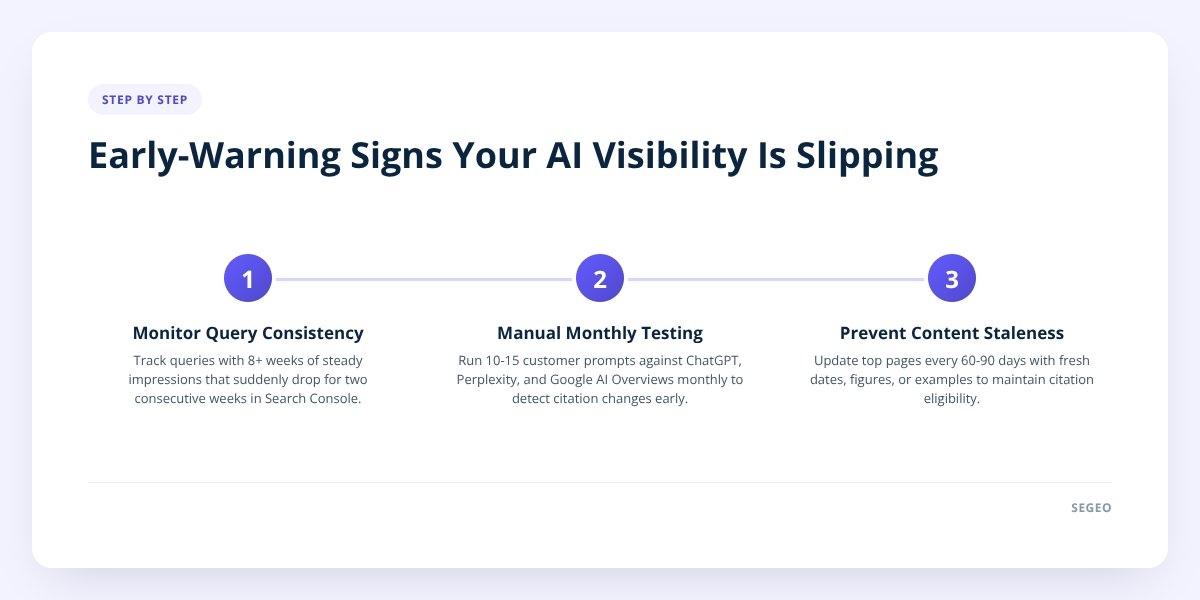
Open Google Search Console and look at the Performance report filtered to the last 16 months, then compare the trailing 90 days to the 90 days before that. You're not looking for your traffic total — you're looking for specific queries that used to generate impressions and have gone silent.
Here's the pattern that matters: a query that pulled 15-20 impressions a week for two months straight, then drops to zero or near-zero for two consecutive weeks, is worth investigating. A single bad week is noise. Two in a row on a previously consistent query is a pattern.
- Filter by query, sort by impressions, and export the last six months.
- Flag any query with 8+ weeks of steady impressions followed by a sudden cliff.
- Check if the page that used to answer that query still exists and still loads correctly.
- Note whether a competitor's content started appearing for that exact phrase around the same time.
This matters for AI visibility specifically because AI Overviews and chatbot answers are frequently built from pages that already rank well organically. If Google's crawler has started deprioritizing a page in classic search, it's a reasonable bet the same page is losing ground in AI-generated answers too — those systems draw heavily on the same underlying index and ranking signals. We covered the mechanics of tracking this overlap in more detail in How to Measure If Your Blog Shows Up in AI Search.
Step 2: Manually Test Your Own Prompts Every Month
Pick 10 to 15 questions your ideal customer would type into ChatGPT, Perplexity, or a Google AI Overview search, and run them yourself once a month. This is tedious but it's the only direct window into whether you're still being cited, since no third-party tool reliably tracks this across all three platforms today.
Write down, for each prompt:
| What to track | Why it matters |
|---|---|
| Was your business or blog mentioned at all? | The baseline — did you show up |
| Was your content quoted directly or just your brand name dropped? | Direct quotes signal the AI trusts your phrasing, not just your reputation |
| Which page or post got cited, if any? | Tells you which content is doing the work |
| Did the answer change from last month's test? | A swapped-out source is the clearest early warning you'll get |
Run the exact same 10-15 prompts each time so you're comparing apples to apples. If a prompt cited your blog in August and cites a different site in October, that's a leading indicator worth acting on — long before it shows up as a traffic drop in your analytics.
Don't skip this: a single month of "no citation" on a prompt that used to cite you isn't proof of decline — AI answers vary run to run, even on the identical question. Two consecutive months with the same result is the threshold where it's worth treating as real.
Step 3: Watch for Content Going Stale
Content starts losing its edge for citation purposes once it's been sitting untouched for roughly 60 to 90 days without a fresh date, updated figure, or new example — this is a practical threshold, not a published rule, but it lines up with how often both Google's crawlers and AI retrieval systems tend to re-evaluate a page's relevance. Go through your top 10 pages by traffic and check the last-modified date on each one.
A page that still says "as of 2024" or references pricing, tools, or regulations that have since changed is an obvious target. But staleness isn't only about outdated facts — it's also about a post that never got richer. If a competing article added a comparison table, a worked example, or a named source citation, and yours didn't change at all, an AI answer engine choosing between the two has a reason to prefer theirs.
This is also where topical drift shows up. If your last 20 posts wandered from your actual service area into tangential trend pieces chasing search volume, you've diluted the topical authority that got you cited in the first place. AI systems and Google both reward sites that go deep on a consistent set of subjects over ones that publish broadly and shallowly — a point we dig into in Why Your Small Business Blog Isn't Ranking.
Step 4: Decide Whether It's a Real Problem or a False Alarm
Act when the signal repeats across two or more of the checks above in the same direction; wait when it's a single metric moving once. A query dropping for one week, a prompt test coming back empty one month, or a traffic dip during a known slow season for your industry — none of those alone justify a content overhaul.
Real problems tend to stack:
- A query that dropped in Search Console and the page that used to answer it hasn't been touched in 100+ days.
- A prompt that stopped citing you and a competitor's newer, more specific post now shows up in its place.
- Traffic down and the content itself has gone quiet on updates for a full quarter.
False alarms usually have an obvious external explanation: a seasonal dip, a site-wide outage during a crawl, or normal month-to-month variance in how an LLM samples sources. Before you panic, check whether the drop is isolated to one page or spread across your whole site — a site-wide dip points to a technical issue, while a single-page dip points to that page's content specifically.
Quick Fixes Once You Catch a Real Decline
Update the page, don't rebuild it from scratch — most declines are fixable with targeted changes rather than a full rewrite. Three moves tend to matter most:
- Tighten topical alignment. If your recent posts have drifted from your core service area, pull the next several topics back toward what you're actually known for and demonstrably good at.
- Strengthen your E-E-A-T signals. Add a named author or expert, a specific example with real numbers, or a reference to a credible source — Google's own quality guidelines describe experience, expertise, authoritativeness, and trust as factors its systems weigh, and AI answer engines tend to favor the same kind of concrete, attributed content.
- Reformat for citation. Break dense paragraphs into scannable lists, add a direct-answer sentence right under each heading, and make sure a skimming reader — human or machine — gets the key fact in the first line. We walked through the specific formatting patterns that help here in How to Structure Your Blog So Google and AI Actually Find It.
The hard part isn't knowing these fixes — it's doing them consistently, on a schedule, across dozens of posts, while also running a business. That's the exact gap Segeo is built to close: it picks topics from live trend data so your blog doesn't drift, structures every post so ChatGPT, Gemini, and Perplexity can cite it, checks each new topic against your last 30 posts to avoid the circling-the-same-ideas problem that causes staleness, and publishes a finished post to your own site every day instead of letting a content calendar quietly go cold.
If you'd rather not run the monthly prompt-testing routine by hand indefinitely, that diagnostic work is worth doing once to understand what's happening to your content — then automating the publishing side so the underlying problem doesn't recur.
Ready to stop guessing at the monthly check-in? See how Segeo's daily publishing and AI-visibility tracking works and connect your site in about five minutes.
Checklist: Spotting Declining AI Visibility Early
- Export six months of Search Console query data and flag any query with 8+ weeks of steady impressions followed by a sudden cliff.
- Write down 10-15 real customer prompts and test them against ChatGPT, Perplexity, and Google AI Overviews.
- Record for each prompt whether you were cited, quoted directly, and which specific page was used.
- Re-run the same prompt list next month and compare results side by side.
- Check the last-modified date on your top 10 traffic pages and flag anything past 90 days untouched.
- Review your last 20 blog posts for topical drift away from your core services.
- Confirm whether a drop is isolated to one page or spread site-wide before deciding it's a real problem.
- Update stale pages with a fresh date, a specific example, or a named source rather than rewriting from scratch.
