
Quick answer: A blog that performs well for SEO and AI visibility needs three things: a flat, logical category structure, URLs that describe content without extra junk, and internal links that connect related posts into topic clusters. Posting daily or weekly doesn't matter much if the posts sit in isolation — search engines and AI assistants both rely on structure to figure out what you're actually an authority on. Fix the architecture first, then worry about output volume.
Key takeaways
- A blog with 20 well-linked, clearly categorized posts can outperform one with 100 scattered, unlinked posts for both Google rankings and AI citations.
- URLs should describe the topic in plain words — long date-stamped or numbered URLs (like /2026/10/post-47) give Google and AI crawlers no useful signal.
- Internal linking between related posts is what turns a pile of content into a "topic cluster" — the structure search engines use to judge subject-matter authority.
- Schema markup doesn't guarantee a ranking or an AI citation, but it gives both systems a clean, machine-readable summary of what each post is about.
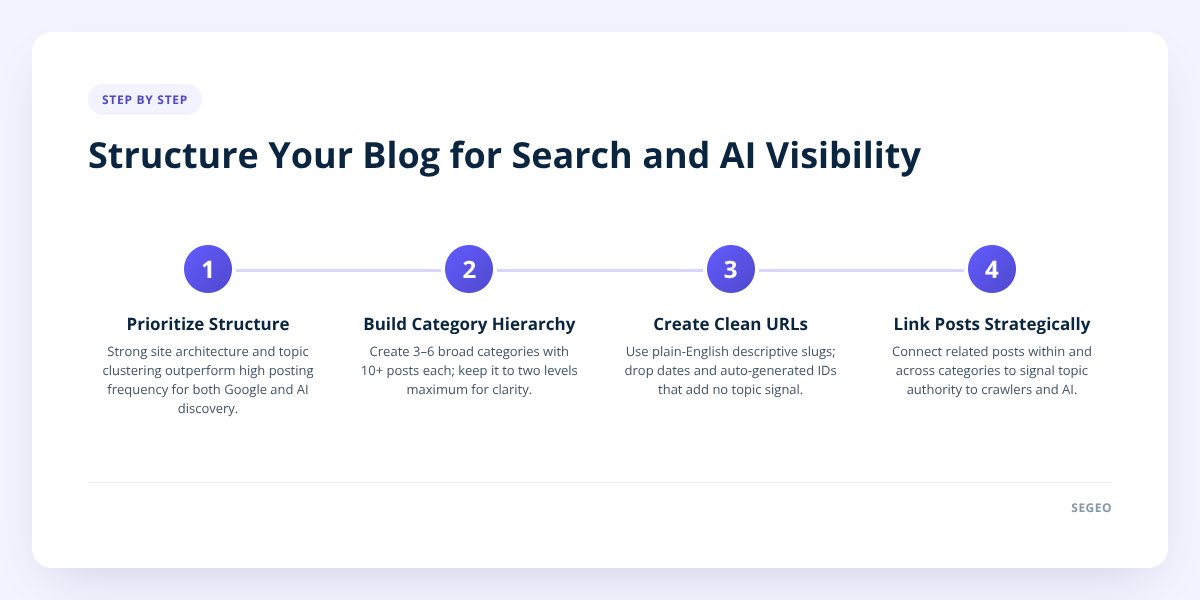
Step 1: Understand Why Structure Beats Frequency
Posting five times a week does nothing if none of those posts connect to each other. Google and AI assistants both build a map of your site based on how pages relate — which topics you cover in depth, which pages link to which, and whether your content forms a coherent body of knowledge or just a pile of unrelated articles.
Think of it from the crawler's point of view. A bot visiting your blog can't "feel" that you're an expert in, say, residential plumbing repair. It has to infer that from signals: do you have multiple posts on related plumbing topics, do those posts link to each other, and does your site architecture group them under a logical category? A blog with no internal structure looks like 50 strangers standing in a room. A blog with clusters and links looks like a company org chart — and that's what both Google's ranking systems and AI assistants like ChatGPT and Perplexity use to decide who to trust on a topic.
This matters even more now that AI search tools pull answers from specific pages rather than ranking a list of ten blue links. If an AI assistant is choosing which page to cite, a post that's clearly part of a well-organized cluster on your site reads as more credible than an orphaned post with no context around it. We covered the citation side of this in How to Write SEO Content That Google and AI Both Trust, but the structural piece — how posts relate to each other — is what this guide focuses on.
Don't skip this: No one, including Google itself, can guarantee a ranking or an AI citation. What structure does is remove the obstacles that stop good content from being found at all — it's the difference between giving your content a fair shot and burying it.
Step 2: Build a Category Hierarchy That Makes Sense
A good blog category structure has two levels, maybe three at most — more than that and you're organizing for yourself, not for readers or crawlers. Pick 3 to 6 broad categories that reflect the actual services or topics your business covers, and resist the urge to create a new category for every post idea.
A landscaping company's blog, for example, might use categories like:
| Category | Example post topics |
|---|---|
| Lawn Care | Mowing schedules, fertilizing timing, weed control |
| Seasonal Maintenance | Fall cleanup, spring prep, winterizing sprinklers |
| Hardscaping | Patios, retaining walls, walkway materials |
| Local Guides | Best plants for your climate zone, permit requirements |
Each category becomes a hub. The category page itself should list and link to every post underneath it, and ideally include a short paragraph summarizing what the category covers — that paragraph gives Google a clean topic signal and gives an AI assistant a summary it can quote.
A few rules worth following:
- Keep categories broad enough to hold 10+ posts over time, not narrow one-off buckets.
- Never let a post sit in more than one or two categories — it dilutes the signal about what the post is really about.
- Avoid categories that exist only because an owner liked a single blog idea; if you can't imagine five more posts fitting there, fold it into a broader category.
- Review your category list every few months and merge any that have fewer than three posts.
Step 3: Fix Your URL Strategy
Your URLs should read like a short, plain-English description of the page — nothing else. A URL like yoursite.com/blog/how-often-should-small-businesses-change-furnace-filters tells Google and an AI crawler exactly what's on the page before they even read a word of content. A URL like yoursite.com/blog/2026/10/post-id-4471 tells them nothing.
Common URL mistakes and the fix for each:
| Mistake | Why it hurts | Fix |
|---|---|---|
Date-stamped URLs (/2024/03/...) |
Makes evergreen content look outdated, adds no topic info | Drop the date from the URL; keep it in the post metadata instead |
| Auto-generated numeric slugs | Zero descriptive value for crawlers or readers | Set a custom slug using your target phrase |
Category stacked into the URL (/blog/lawn-care/lawn-care-fertilizing-tips) |
Redundant and bloated | Keep the slug lean: /blog/fertilizing-tips |
| Keyword-stuffed slugs | Reads as spam to both humans and algorithms | Use 4–7 words that describe the post naturally |
If you're on WordPress, this is a setting you change once in your permalink structure and it applies going forward — you don't need to rebuild old URLs to benefit, though redirecting a handful of your highest-traffic legacy URLs to cleaner ones is worth the hour it takes.
Step 4: Link Posts Together on Purpose
Internal linking is the single most underused structural tool in small business blogging. Every new post should link to at least two or three older, related posts — and those older posts should, in turn, get updated with a link forward to the new one. This is how a "topic cluster" forms: a group of posts all linking to each other around a shared subject, with one broader "pillar" post anchoring the group.
A practical pattern that works for almost any small business blog:
- Write one comprehensive pillar post on a core topic (example: "A Homeowner's Guide to Gutter Maintenance").
- Write 5–10 narrower posts that each cover one piece of that topic in depth (cleaning frequency, gutter guards, seasonal timing, signs of damage).
- Link every narrow post back to the pillar post, and link the pillar post out to each narrow post.
- When you publish something new that relates to an older post, go back and add a link from the old post to the new one — don't just link forward.
That fourth step is the one almost everyone skips, and it's the one that matters most over time. A blog that only links new posts to old ones builds a structure that gets more tangled with age. A blog that links both directions builds a web that gets stronger with every post. We go deeper on the mechanics of this in How to Structure Content So Google and ChatGPT Both Get It.
This is also where manual blogging tends to break down — going back through dozens of old posts to add links every time you publish something new is tedious, and it's the first thing that gets skipped when you're busy running the business. Segeo checks new topics against your last 30 published posts before writing anything, specifically so the blog keeps building coverage instead of circling the same handful of ideas with no connective tissue between them.
Step 5: Use Metadata and Schema to Spell Things Out
Metadata and schema markup don't change what your content says — they change how clearly machines can read it. Schema markup is a small block of structured code added to a page that labels its parts in a standard format: this is the author, this is the publish date, this is the FAQ section, this is the business's address and phone number.
For a small business blog, a few schema types are worth prioritizing:
- Article schema — marks the post with a headline, author, and publish date so search engines display it correctly in results.
- LocalBusiness schema — ties your blog content back to your business's name, address, and service area, reinforcing local relevance.
- FAQPage schema — if a post answers a specific question directly, this markup can make that Q&A eligible for a featured snippet or an AI Overview excerpt.
- BreadcrumbList schema — shows the category path (Home > Lawn Care > Fertilizing Tips), reinforcing the hierarchy from Step 2.
None of this guarantees a featured snippet or an AI citation — Google and AI assistants both make their own judgment calls about what to surface. But a post with clean schema gives them a straightforward, unambiguous summary to work from, instead of making them guess by parsing loose paragraphs. We cover the on-page side of this — headers, answer placement, and formatting that AI tools tend to pull from — in How to Structure a Blog Post for AI Overviews Optimization.
Step 6: Audit and Fix Your Existing Blog in 30 Days
You don't need a redesign to fix a messy blog — you need a month of focused cleanup. Here's a realistic pace:
Week 1 — Inventory. Export a list of every published post with its URL, category, and publish date. Flag any post with zero internal links pointing to it (these are your "orphan" posts) and any URL that's date-stamped or numeric.
Week 2 — Consolidate categories. Merge thin categories (fewer than three posts) into broader ones. Rewrite each category page with a short paragraph describing what it covers.
Week 3 — Link in both directions. Starting with your highest-traffic posts, add 2–3 internal links to each one pointing to related posts, and add return links from those related posts back. Prioritize connecting orphan posts into at least one cluster.
Week 4 — Metadata and redirects. Add or clean up schema markup on your top 10 posts. For any URL you change, set up a 301 redirect from the old URL so you don't lose existing search equity.
Running this audit manually across 50 or 100 old posts takes real hours — it's the kind of maintenance work that's easy to plan and hard to actually finish. If you're starting a blog from scratch rather than fixing an old one, you avoid most of this entirely by building the structure in from day one instead of retrofitting it later.
This is the gap Segeo is built to close: it publishes one finished, on-topic post to your own site every day, picks each topic from live trend data so posts don't repeat ground you've already covered, and checks every new post against your last 30 to keep building out real topic coverage instead of circling the same ideas. It also writes in your business's own voice, extracted from your site at setup, and structures every post so ChatGPT, Gemini, and Perplexity can cite it — not just Google. Setup is a one-step WordPress connection (or a Git-based setup for Wix, Shopify, or a custom site), and you can see the full pricing at segeo.net/pricing — plans start from $89 a month with a 14-day money-back guarantee.
What to Do Next
Pick one piece of this guide and start there this week — don't try to fix categories, URLs, and links all at once. The highest-leverage starting point for most small business blogs is internal linking, because it's the cheapest fix and the one that compounds fastest as you keep publishing.
Checklist: Structuring Your Blog for SEO and AI Visibility
- Audit every published post and list its URL, category, and internal links.
- Flag orphan posts with zero internal links pointing to them.
- Consolidate any category with fewer than three posts into a broader one.
- Rewrite a short descriptive paragraph for each category page.
- Replace date-stamped or numeric URLs with plain-English slugs going forward.
- Set up 301 redirects for any URL you change.
- Add 2–3 internal links to your top 10 posts, in both directions.
- Add Article, LocalBusiness, and FAQPage schema to your highest-traffic posts.
- Build one pillar post per core topic and link your narrower posts to it.
Related articles
- How to Structure Content So Google and ChatGPT Both Get It
- How to Structure a Blog Post for AI Overviews Optimization
- How to Write SEO Content That Google and AI Both Trust
