
Quick answer: Track three numbers — impressions and clicks in Google Search Console, and citation rate in AI assistants like ChatGPT and Perplexity. Skip pageviews, bounce rate, and time-on-page; they don't tell you whether a post is winning or wasting your time. Check Search Console weekly, check AI citations monthly, and give any post at least 60 days before deciding it failed.
Key takeaways
- Google Search Console is free and shows exactly which queries triggered your post to appear, even if nobody clicked — that data doesn't exist anywhere else.
- A post can rank on page one and still get zero clicks; position without clicks usually means the title or meta description isn't earning the click.
- New blog content typically needs 60–90 days of indexing and ranking signal before it's fair to judge, according to Google's own Search Central documentation on how long it takes for changes to show up in search results.
- Checking whether ChatGPT or Perplexity cite your content requires manually prompting them with real customer questions — there's no dashboard for this yet, so build it into a monthly routine.
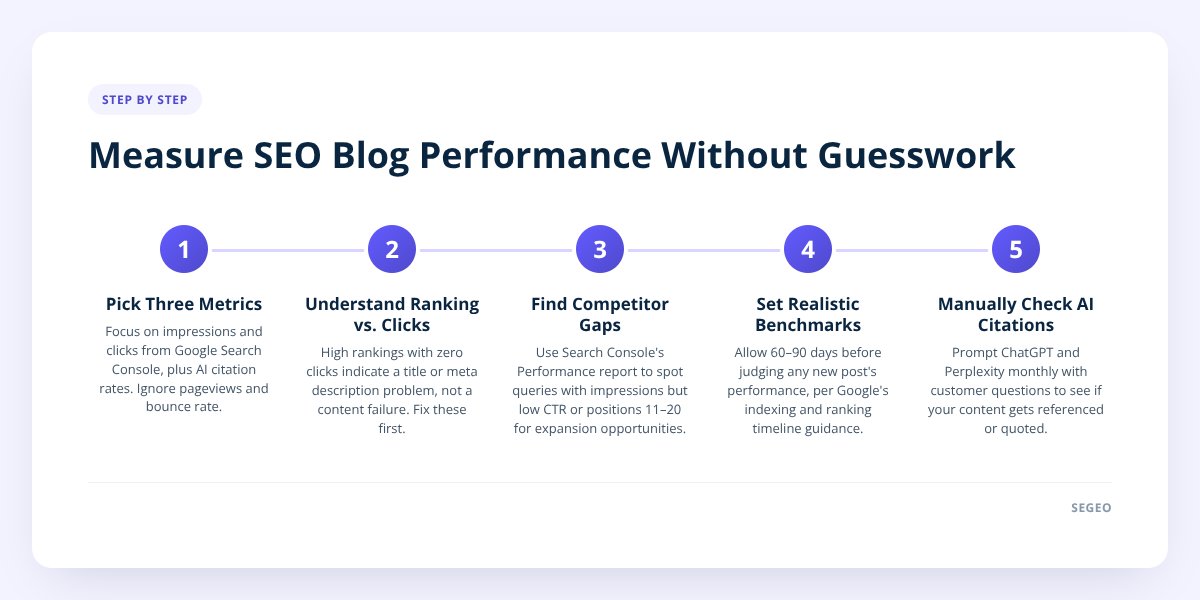
Step 1: Pick the three metrics that actually matter
Most small business owners check pageviews and call it a day. That number is close to useless on its own — it tells you people arrived, not why, and not whether they were anyone you wanted.
The three metrics worth your time:
- Impressions (Google Search Console): how many times your post showed up in search results, even if nobody clicked. This is your earliest signal that Google understands what the post is about.
- Clicks (Google Search Console): how many of those impressions turned into an actual visit. This is where intent and relevance get tested.
- Citation rate (manual check): how often AI assistants like ChatGPT, Perplexity, or Google's AI Overviews reference or quote your content when someone asks a related question.
Everything else — bounce rate, average session duration, pages per session — is a distraction for a small business blog. Those metrics matter for huge content teams running A/B tests on layout. They don't tell a plumber or a bakery owner whether the post about "how often to service a water heater" is bringing in the right people. We go deeper on the AI-citation half of this in How to Measure If Your Blog Shows Up in AI Search.
Google Search Console is free, and if you haven't set it up yet, that's step zero — it takes about ten minutes to verify your site and start collecting data.
Step 2: Understand why ranking without clicks isn't a win
A post sitting in position 4 for a search term with zero clicks is not succeeding — it's a half-finished job. Ranking means Google trusts the page enough to show it. Clicks mean the title and description actually convinced someone to leave the search results and visit.
Here's the gap in practice: a post titled "Water Heater Maintenance Tips" might rank fine but get skipped because it sounds generic. A post titled "How Often Should You Flush Your Water Heater? (And What Happens If You Don't)" answers a real question in the title itself — that's the one people click.
If you see decent impressions and low clicks in Search Console, that's a title and meta description problem, not a content problem. Fix those two things before you touch the body of the post.
The flip side: a post can be quietly winning with AI even when Search Console looks unremarkable. AI assistants don't send you referral traffic the way a Google click does — when ChatGPT answers a question using your blog post, the user often never visits your site at all. They get the answer and move on. So a post with modest impressions and clicks might still be doing real work for your reputation if AI tools are citing it. The only way to know is to ask the AI directly — more on that in step 5.
Don't skip this: never judge a post by pageviews alone. A post with high traffic but zero inquiries or sales is attracting the wrong readers, and a post with low traffic but consistent AI citations may be building trust you can't see in a traffic graph.
Step 3: Use Search Console to find keywords your competitors are missing
Open the Performance report in Google Search Console, filter by your blog's URL path, and sort by impressions. Look for queries where you're getting impressions but ranking below position 10 — these are topics Google already thinks you're somewhat relevant for for, but you haven't written enough to win.
This is the single most underused feature of a free tool. Most competitors in any local industry are not checking this report at all. They're guessing at blog topics from a content calendar template instead of letting real search data tell them what people are typing.
What to look for specifically:
- Queries with 10+ impressions but a click-through rate under 2% — the demand is there, your answer isn't convincing enough.
- Long, specific phrases (four or more words) showing up in the "Queries" tab that you never targeted directly — these are often high-intent questions worth their own dedicated post.
- Queries where you rank between positions 11 and 20 — close enough that one more well-structured post on the exact phrase can push you onto page one.
- A spike in impressions for a topic you only mentioned in passing — that's a signal to expand it into its own post.
This is also where automated topic selection earns its keep. Segeo's platform pulls from live trend data and real local-intent keywords so you're not guessing at topics from a generic calendar — it's built around the same idea of following where actual search demand is, rather than what a content calendar says you should post about this week.
Step 4: Set realistic benchmarks by month
Expecting meaningful traffic in week two is the fastest way to quit a blog that was about to work. Google's own documentation on how search indexing works makes clear that new pages take time to crawl, index, and earn ranking signal — there's no shortcut around that timeline.
Here's a realistic progression for a small business posting consistently:
| Timeframe | Search Console impressions | Clicks | AI citations |
|---|---|---|---|
| Month 1 | Low, scattered across many queries | Few to none | Unlikely yet |
| Month 3 | Steady growth, some queries repeating | A handful per week | Occasional, if content answers specific questions well |
| Month 6 | Noticeable month-over-month increase | Regular, trackable trend | More consistent, especially for niche questions |
| Year 1 | Compounding — older posts still pulling impressions | Meaningful share of site traffic | Established pattern across multiple assistants |
These are directional, not guarantees — nobody, including Segeo, can promise a ranking position or an AI citation, since both depend on factors outside any one site's control. What's realistic to expect is that consistency compounds: a blog publishing daily builds a much larger footprint of indexed, topic-specific pages than one publishing monthly, simply because there's more surface area for Google and AI tools to find. We cover the daily-versus-weekly math in more detail in How Often Should I Blog? Daily Beats Weekly for SEO.
The mistake most owners make here is checking traffic every three days and getting discouraged. Check Search Console weekly for trend direction, not daily for individual numbers — daily checks mostly measure noise.
Step 5: Spot and fix posts that rank but don't perform
A post that ranks but doesn't drive clicks, inquiries, or citations is a red flag, not a write-off — it usually means one specific thing is broken, and it's fixable. Run this diagnostic before you write another post:
- Check the title in Search Console's query report — does it match what people are actually searching, or does it use internal jargon customers don't type?
- Check click-through rate against impressions — under 2% on a page-one ranking usually means the meta description isn't selling the click.
- Reread the opening two sentences — does it answer the question immediately, or does it warm up for three paragraphs first?
- Ask ChatGPT or Perplexity the exact question the post answers — if your business isn't mentioned at all after several attempts, the content may be too vague or too similar to dozens of other sites.
- Check whether the post has gone stale — a "best practices for 2024" post sitting untouched in 2026 signals to both Google and AI tools that it's outdated.
If a post fails more than two of these checks, don't delete it — rewrite the title and opening, and give it another 30 days before judging again. A full rewrite of body content should be the last resort, not the first move.
This is also where review mode matters if you're using any kind of automated publishing: you want the ability to catch a post that's off-target before it goes live, not after it's been sitting unclicked for a month. Segeo builds that control in — edit, regenerate, or unpublish any post, or switch on review mode so nothing publishes without your approval.
What to do next
Set a recurring 15-minute block every Monday to check Search Console impressions and clicks, and a monthly 30-minute block to test your top five post topics against ChatGPT and Perplexity directly. That's the entire measurement system — no dashboard subscription required, no vanity-metric spreadsheet.
If keeping that rhythm alongside actually writing and publishing daily sounds like more than your week has room for, that's the exact gap Segeo is built to close — daily posts chosen from real search trend data, written in your business's own voice, with a daily email showing what went live and why. See how the setup works on the pricing page.
Checklist: Measuring your blog's SEO and AI performance
- Verify your site in Google Search Console if you haven't already.
- Check the Performance report weekly, sorted by impressions, for your blog URL path.
- Flag any query with high impressions and under 2% click-through rate for a title rewrite.
- Note queries ranking positions 11–20 as candidates for a dedicated, deeper post.
- Ask ChatGPT and Perplexity your top five customer questions once a month and record whether your business is mentioned.
- Give every new post a minimum of 60 days before judging its performance.
- Rewrite the title and opening paragraph on any underperforming post before rewriting the whole thing.
- Mark outdated posts (old years, discontinued services) for a content refresh.
Related articles
- How to Measure If Your Blog Shows Up in AI Search
- How Often Should I Blog? Daily Beats Weekly for SEO
- How to Write SEO Content That Google and AI Both Trust
