
Quick answer: Most blogs get skipped by AI Overviews for one of three reasons: the content looks stale, it's too thin to show real expertise, or it's missing the trust signals AI systems look for, like author names, specifics, and internal links to related posts. Run a quick audit of your last 90 days of posts, your Google Search Console data, and two competitor blogs that do get cited — then fix the gaps with a publishing schedule, topic clusters, and refreshed old posts. Most fixes are structural, not creative, and can be done in an afternoon.
Key takeaways
- Google's own documentation on AI Overviews says the feature pulls from pages that already rank well organically — there's no separate submission process, per Google Search Central.
- Posts older than 12–18 months with no updates are a common freshness red flag; AI systems favor content that shows recent activity on the topic.
- A blog with 40 posts covering one topic from every angle outperforms a blog with 200 posts spread across unrelated subjects — topical depth beats volume.
- You can check which of your pages show up in AI Overviews using Google Search Console's performance filters and manual spot-checks in ChatGPT and Perplexity.
Why do blogs get skipped by AI Overviews?
Blogs get skipped because they fail one of three invisible tests: freshness, topical depth, or trust signals. AI systems don't publish a checklist for this, but the pattern across blogs that do get cited versus ones that don't is consistent enough to reverse-engineer.
Freshness is the most common disqualifier. If your most recent post is from eight months ago, or your "recent posts" widget is quietly out of date, AI crawlers read that as a signal the business — and the information — might be stale. This matters more for topics that change, like pricing, hours, services, or anything tied to a season or trend.
Topical depth is the second filter. One post about "signs you need a new roof" sitting alone on a roofing company's blog doesn't tell an AI system much. Ten posts that cover roof inspections, material comparisons, storm damage, insurance claims, and local permit rules tell a very different story — this business actually knows the subject.
E-E-A-T signals are the third, and the one most small business owners skip entirely. This stands for Experience, Expertise, Authoritativeness, Trustworthiness — a framework Google describes in its Search Quality Rater Guidelines. In practice, it shows up as small details: a named author, a real business address, specific numbers instead of vague claims, and posts that link to each other in a way that shows a body of knowledge, not a pile of disconnected articles.
Here's the thing most owners miss: you can have genuinely good writing and still fail all three. A well-written post published once a quarter, with no byline, sitting in isolation from your other content, checks none of the boxes — no matter how good the sentences are.
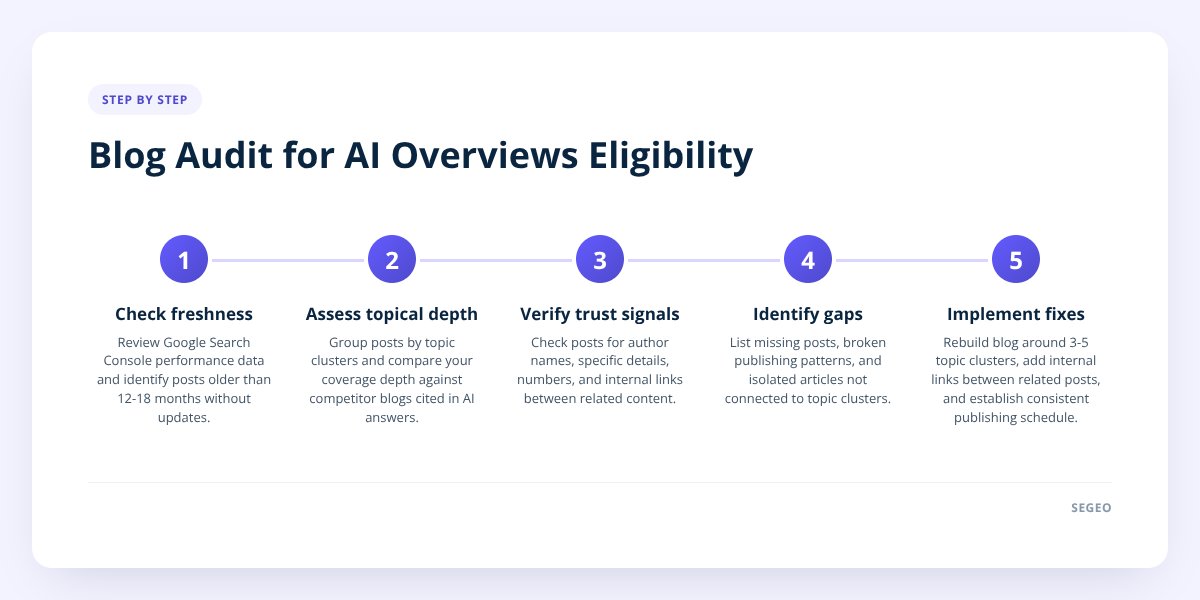
Step 1: Audit what you have
Before fixing anything, find out where you actually stand. This takes about 30 minutes if you're organized, longer if your blog has been neglected.
Start in Google Search Console, the free tool Google provides for site owners to see how their pages perform in search:
- Open the Performance report and filter by "Search type: Web," then check the date range for your blog's URL pattern.
- Look at impressions, not just clicks — a page can show up in AI Overviews-adjacent searches without getting a click, since the answer is already on the results page.
- Check which pages have zero impressions over 90 days. Those are candidates for a rewrite or a delete.
- Note your average position for your best pages. Anything consistently ranking outside the top 20 is unlikely to be pulled into an AI summary, since Google has stated AI Overviews draw from organically ranking content.
Next, audit your publishing pattern:
- Count how many posts you published in the last 90 days.
- Look for long gaps — three weeks or more with nothing new is a pattern AI systems and human readers both notice.
- Check whether your posts cluster around a handful of related topics or scatter across unrelated ones.
Finally, look at two or three competitor blogs that do appear in AI answers. Ask ChatGPT or Perplexity a question your industry gets asked often, and see whose content gets referenced or summarized. Open that blog and look at:
- How often they publish.
- Whether posts link to each other.
- Whether they name specific numbers, processes, or local details instead of generic advice.
This step alone usually explains most of the gap. We covered the citation side of this in more detail in How Often Does Google AI Overview Cite Small Blogs?
Step 2: Fix the structural problems
Most blogs don't need better writing — they need better architecture. Three fixes do the heavy lifting.
Rebuild around topic clusters. Pick three to five core topics your business genuinely serves, and group your posts under them. A plumbing company's clusters might be "water heaters," "drain issues," and "emergency repairs." Every new post should feed one of these clusters instead of starting a new, unrelated thread. This is the single biggest lever for topical depth, since it turns a scattered archive into something that reads as expertise.
Add internal links between related posts. If you wrote about water heater repair in March and water heater replacement cost in July, those two posts should link to each other. Right now, most small business blogs have posts sitting as islands — no inbound or outbound links, nothing connecting them. AI systems and search crawlers both use internal links to understand which pages belong together and which page is the authority on a subtopic. We go deeper on this exact structure in How to Structure Your Blog So Google and AI Actually Find It
Refresh your stale posts instead of abandoning them. A two-year-old post with outdated pricing or a dead link isn't doing you any favors sitting untouched. Go through your top 10 pages by traffic and:
- Update any dollar figures, dates, or statistics that have changed.
- Fix broken links and outdated service names.
- Add a line or two reflecting anything that's changed in your field since you wrote it.
- Change the "last updated" date if your site displays one.
Don't skip this: a post that hasn't been touched in over a year, sitting on a blog that hasn't published in months, is the single clearest freshness signal working against you — fix the publishing gap before you worry about anything else on this list.
Step 3: Decide how you'll keep this up
This is where most audits fall apart. The fixes above work, but they only work if the blog keeps moving. A one-time cleanup followed by three more months of silence puts you right back where you started.
The honest tradeoff is this:
| Approach | Time required | Consistency risk |
|---|---|---|
| Write it yourself | 2–5 hours per post | High — easiest thing to deprioritize when business gets busy |
| Hire a freelance writer | Managing briefs, edits, revisions | Medium — depends on their reliability and your editing time |
| Automated daily publishing | ~5 minutes of setup, then hands-off | Low — runs on a schedule regardless of your week |
If you're doing this yourself, block recurring time on your calendar rather than relying on getting to it "when things slow down." A posting rhythm of once a week is the realistic minimum to build topical depth within a year — we laid out the math on frequency in How Often Should I Blog? Daily Beats Weekly for SEO
This is also the exact gap Segeo was built around. It publishes a finished post to your own website every day, picks topics from live trend data so you're not guessing what to write about, checks every new topic against your last 30 posts so the blog actually builds a cluster instead of repeating itself, and writes in your business's own voice pulled from your existing site. You keep a review mode if you want to approve posts before they go live, or let it run on its own.
Step 4: Track what's actually working
You confirm a fix worked by checking three places, not guessing from vibes. Set a reminder to do this monthly.
Google Search Console is your first stop:
- Filter the Performance report by query and look for impressions growing on pages you refreshed or newly published.
- Check the "Pages" tab for previously zero-impression pages that now show activity.
- Compare your 90-day totals before and after you started the fix.
Manual spot-checks in AI tools are the most direct test:
- Ask ChatGPT, Perplexity, and Google (in AI Overviews mode) the exact questions your audience asks.
- Note whether your business or specific post gets referenced, summarized, or linked.
- Repeat this every few weeks — citation isn't stable day to day, so one miss doesn't mean failure.
Third-party rank trackers that include AI visibility features can automate part of this, though most are built for larger sites and may be overkill for a single small business blog. A manual check every two weeks is usually enough signal at this scale.
Be realistic about the ceiling here: no tool, including ours, can guarantee a spot in an AI answer or a Google ranking, and anyone who tells you otherwise is selling something. What consistent publishing does is put you in the pool of pages that are even eligible to be considered — the rest is out of anyone's direct control. We explained why this specific visibility gap happens in Why Your Blog Posts Aren't Showing Up in AI Overviews
What to do next
Start with the audit, not the fix. Spend 30 minutes in Search Console and two AI tools before you touch a single post — you need to know whether your problem is freshness, depth, or trust signals before you can fix the right one. Then pick one structural change (clusters, internal links, or refreshes) and do it for your top 10 pages before worrying about everything else.
If keeping a consistent schedule is the part you know you'll drop in six weeks, that's worth solving directly rather than willing yourself into more discipline. Segeo's daily posts, 30-day content planner, and built-in trend-based topic selection exist specifically so the publishing rhythm doesn't depend on your calendar staying clear. Check segeo.net/pricing if you want the hands-off version running by this afternoon.
Checklist: Audit your blog for AI Overviews eligibility
- Pull your last 90 days of Search Console impressions and flag zero-impression pages.
- Count your posts published in the last 90 days and note any gaps longer than three weeks.
- List your blog's current topics and check whether they cluster or scatter.
- Ask ChatGPT and Perplexity two or three questions your customers actually ask and note what gets cited.
- Open a competitor blog that does get cited and compare their publishing frequency and internal linking.
- Update dollar figures, dates, and dead links on your top 10 pages by traffic.
- Add at least three internal links between posts that cover related subtopics.
- Set a recurring calendar block or automated tool to keep publishing consistent going forward.
