
Quick answer: Blog ROI isn't traffic, rankings, or impressions — it's leads sourced from the blog, conversion rate on those leads, and whether AI assistants cite your posts, tracked against what it costs you to publish. For a daily blog, pull a 30-day baseline (sessions, leads, source tagging) before you automate, then compare the same window after. If leads-per-post and cost-per-lead both improve, it's working — regardless of what your traffic chart looks like.
Key takeaways
- Traffic and keyword rankings are vanity metrics when viewed alone — they measure activity, not revenue, and can rise for months with zero new customers.
- The three metrics that actually predict ROI are blog-sourced leads, conversion rate by source, and citations in AI answers (visible in Google Search Console's performance data).
- Most CRMs can tag blog referrals automatically with UTM parameters and a hidden form field — no manual spreadsheet required.
- A 30-day before/after benchmark is the fastest way to know if daily publishing, automated or not, is actually paying for itself.
Why More Blog Posts Doesn't Automatically Mean More Sales
Publishing daily can make your traffic chart climb for months without a single new customer showing up. That's because traffic — total visits to your site — counts everyone equally: a customer ready to buy, a student doing homework, and a bot crawling your sitemap all register as "a visit."
The same problem applies to two other numbers small business owners love to screenshot:
- Keyword rankings tell you where you sit in search results, not whether anyone clicked and bought something.
- Impressions (how many times your page appeared in search results, tracked in Google Search Console) can double just because Google started showing your page for more queries — including ones with zero buying intent.
None of these are bad to look at. They're early signals that your content is being indexed and surfaced. But if you're running a daily automated blog and judging it purely on "traffic is up 40%," you're measuring effort, not outcome. A business can publish 90 posts in 90 days, watch sessions triple, and still not know if a single customer came from it.
The fix isn't to stop checking traffic — it's to stop stopping there. Traffic should be the first filter, not the final scorecard.
The Three Metrics That Actually Predict Blog ROI
Three numbers tell you whether daily blogging is making money: leads sourced from the blog, your conversion rate by source, and whether AI tools are citing your content. Everything else is context.
1. Leads sourced from the blog
This is the count of actual inquiries — form fills, calls, booked appointments — that can be traced back to a blog post, not just "organic traffic" as a whole. If you can't currently answer "how many leads came from blog content last month," that's the first gap to close, and it usually takes less than an hour of CRM setup (covered below).
2. Conversion rate per source
Not every lead is equal. A visitor who found you through a blog post about a specific problem you solve tends to convert differently than someone who clicked a paid ad or landed on your homepage from a branded search. Tracking conversion rate by source — blog vs. paid vs. direct vs. referral — tells you whether blog traffic is high-intent or just high-volume. A blog sending 50 visits a month at a 12% conversion rate is outperforming one sending 500 visits at 0.5%, even though the second looks more impressive on a dashboard.
3. AI citations
This is the newest metric and the one most small business owners aren't tracking yet. When ChatGPT, Perplexity, or Google's AI Overviews answer a question and reference your business or pull language from your site, that's a citation — and it drives a different kind of visit: someone who already trusts the recommendation before they click. We covered how to actually track this in How to Measure If Your Blog Shows Up in AI Search, but the short version is that Google Search Console now shows impressions and clicks from AI Overviews in its performance reports, and that's the closest thing to a public, verifiable signal most small businesses have access to.
Don't skip this: if you only track one number going forward, make it leads sourced from the blog. Traffic and rankings can look great for months while that number stays at zero — and that's the number that pays your bills.
How to Tag Blog Referrals in Your CRM Without Manual Work
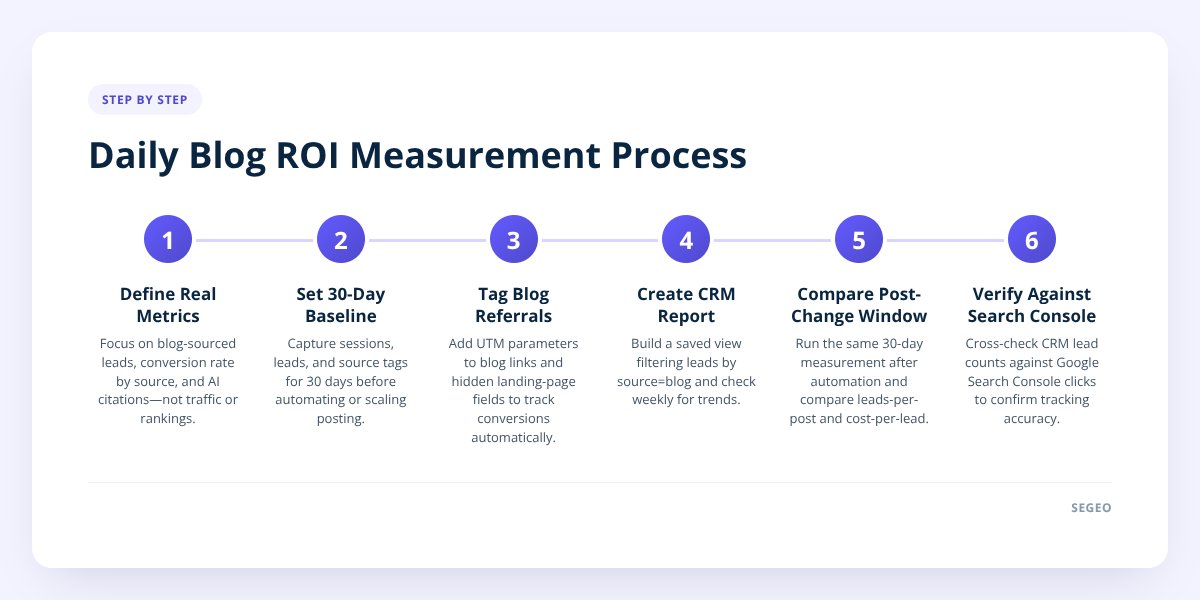
You tag blog referrals automatically by using UTM parameters on internal links and a hidden form field that captures the landing page — set up once, then it runs forever. Here's the setup, step by step:
- Add UTM tags to your blog's call-to-action links. Any link inside a blog post that points to your contact or booking page should carry a tag like
?utm_source=blog&utm_medium=organic&utm_campaign=post-name. Most CRMs and form tools (HubSpot, Mailchimp, Gravity Forms, Jotform) read these automatically if the link is clicked directly. - Add a hidden "landing page" field to your contact form. This captures the URL where the visitor first arrived, even if they browsed five pages before filling out the form. Most form builders support this as a one-time setting — look for "hidden field" or "URL parameter" in your form editor.
- Create a CRM view or report filtered by source = blog. Once the data is flowing in, build one saved report that shows leads where source contains "blog." Check it weekly, not daily — daily swings in lead count are noise.
- Cross-check against Search Console's landing page report. If your CRM says five leads came from a specific post, Search Console should show clicks landing on that same URL in a similar window. Big mismatches usually mean a tracking gap, not a data problem with the lead itself.
- Tag social-driven blog traffic separately. If you're cross-posting blog content to Instagram or LinkedIn, use a distinct UTM campaign (
utm_campaign=ig-carousel) so you can tell whether social traffic to the blog converts differently than search traffic.
None of this requires a developer. It's form settings and link formatting — about 30 minutes of setup, after which every new lead self-tags on arrival.
What Good ROI Actually Looks Like for a Small Business Blog
"Good" ROI isn't a single number — it's cost-per-lead from the blog compared to your other channels, trending downward over time. If your blog costs you $89 a month and produces even one or two qualified leads that convert to paying customers, most small businesses are already ahead of what they'd spend on paid search for the same leads. The real comparison isn't "is the blog perfect," it's "is the blog cheaper per lead than what I'm already paying elsewhere."
Here's how the math tends to shift when a blog moves from occasional, manual posting to a daily automated blog — a blog that publishes a new post on its own every day, like the kind Segeo runs for small businesses:
| Manual, occasional posting | Daily automated publishing | |
|---|---|---|
| Typical output | 1–4 posts/month, inconsistent | 30 posts/month, consistent |
| Time cost to owner | Hours per post (writing, editing, publishing) | Minutes/day reviewing a daily email receipt |
| Topic coverage | Repeats familiar ideas | Pulls from live trend and search data, checked against recent posts to avoid overlap |
| AI citation surface | Small — few indexed pages discussing your niche | Larger — more indexed pages means more chances to be the source an AI assistant pulls from |
| Cost structure | Freelancer or agency, often $300–$1,000+/post | Flat monthly fee covering unlimited daily posts |
The volume itself isn't the win — it's that volume compounds the surface area for both Google indexing and AI citation, while the time cost to the owner drops to almost nothing. That's the autopilot math: more published pages, less owner time, and a flat cost instead of a per-post bill. We go deeper on picking the right platform for this in How to Choose a Blog Automation Tool That Actually Works.
Worth naming honestly: nobody can guarantee a specific ranking or a guaranteed spot in an AI answer, including Segeo. What consistent daily publishing does is give you more indexed, on-topic pages competing for those spots — which is a different and more honest claim than a guarantee.
Setting Up a 30-Day Benchmark Before You Compare Anything
You need a 30-day baseline before automation starts, or you'll have nothing real to compare against once it does. Here's what to capture, in order:
- Record total blog sessions for the last 30 days from Google Analytics or your site's built-in analytics.
- Pull current keyword rankings for your 5–10 target terms as a reference point, not a scorecard.
- Count leads sourced from the blog using whatever tagging you have — even rough, if UTM tracking isn't live yet.
- Note your conversion rate by source for blog vs. direct vs. paid, if that data exists.
- Check Search Console's AI Overviews data under Performance to see current impressions, even if the number is near zero.
- Log your current cost — freelancer fees, your own hours, or a flat tool price — so cost-per-lead has a real denominator.
- Set a calendar reminder for day 30 to pull the same six numbers again, same date range length, same sources.
The point isn't to prove the new approach worked in 30 days — SEO and AI citation both take longer than a month to fully show up. The point is to have real before-numbers so that 60 or 90 days in, you're comparing data instead of impressions from memory. We laid out the full measurement framework, including what to do when the numbers are ambiguous, in How to Measure SEO Blog Performance Without Guesswork.
What to Do Next
Start with the tagging, not the tool. Get UTM parameters and a hidden landing-page field working on your current site this week, even if you're still writing posts manually — that's the infrastructure every other metric depends on.
Once tracking is live, the publishing volume question gets easier to answer with data instead of guesswork. Segeo runs the daily publishing side of this — a finished post to your own site every day, topics pulled from live trend data, written in your business's voice, structured so Google and AI assistants like ChatGPT and Perplexity can cite it — plus a daily receipt email so you always know what went live and why. Plans start from $89 a month; details are on the pricing page.
Checklist: Measuring Blog ROI on a Daily Publishing Schedule
- Add UTM parameters to every call-to-action link inside blog posts.
- Add a hidden landing-page field to your contact and booking forms.
- Build one CRM report filtered to show leads where source equals blog.
- Record your current 30-day baseline for sessions, leads, and conversion rate by source.
- Check Google Search Console's AI Overviews data under the Performance report.
- Calculate your current cost-per-lead from blog content, including your own time.
- Set a day-30 reminder to re-pull the same metrics and compare side by side.
- Review the CRM report weekly instead of daily to avoid reacting to noise.
