
Quick answer: Daily AI blog posts are automatically written, on-topic articles published to your business website every day using AI tools plus live trend and keyword data — no human writer typing each one from scratch. Expect to pay roughly $89 to a few hundred dollars a month depending on the provider, with setup taking anywhere from five minutes to a few hours. Before booking, confirm how the service picks topics, whether it matches your brand voice, and whether you can review posts before they go live.
Key takeaways
- Daily AI blogging services typically start around $89/month for a fully automated plan, according to pricing published on providers like Segeo — far less than hiring a part-time content writer.
- The best tools pull topics from live trend and search data rather than a fixed content calendar, so posts stay relevant to what people are actually asking.
- Consistent publishing is one of the few factors a business can control that influences both Google rankings and whether AI assistants like ChatGPT or Perplexity cite your site.
- Nobody — no agency, no software — can guarantee a specific ranking or an AI citation; be skeptical of anyone who says otherwise.
How Does Daily AI Blogging Actually Work?
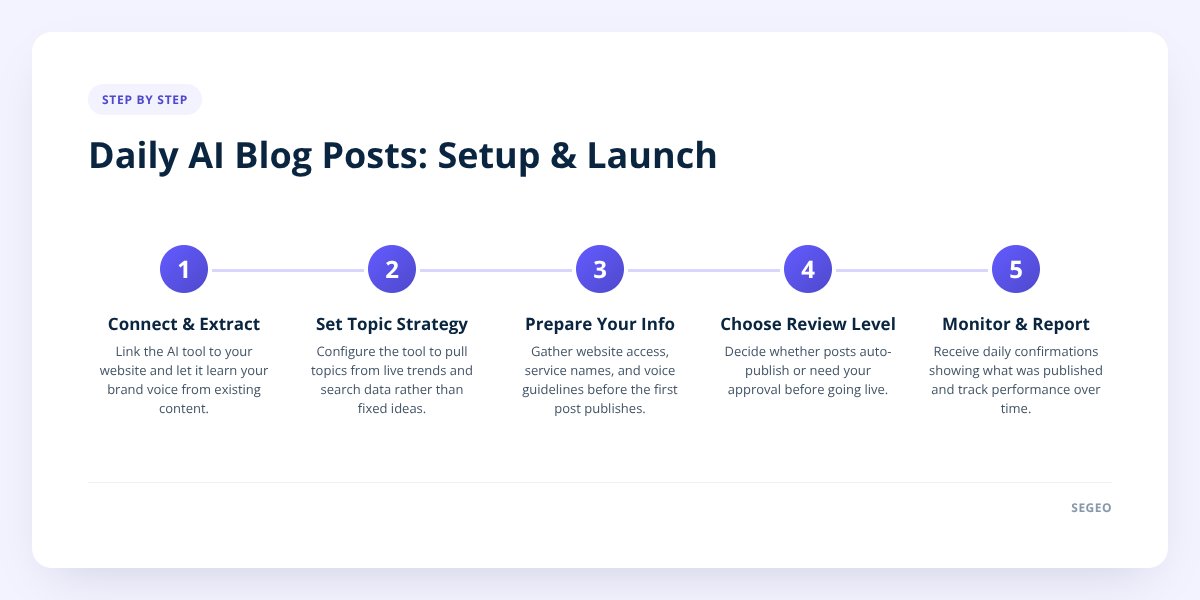
An AI blogging tool connects to your website, studies your existing content and voice, then generates and publishes a new post on its own schedule — usually daily. The good ones don't just spin generic articles; they pull topic ideas from live trend data, search queries, and what's being discussed in your industry that week.
Here's the typical sequence:
- Connection. The tool links to your site — for WordPress, that's usually a one-step application password setup. Platforms like Wix, Shopify, or custom-built sites connect through a hosted blog or a Git repository instead.
- Voice extraction. The system reads your existing site copy to learn how your business talks, so posts don't sound like they were written by a stranger.
- Topic selection. Instead of recycling the same 12 ideas every month, the tool checks live trends, local search intent, and what's already been covered so it doesn't repeat itself.
- Drafting and publishing. A complete post — not an outline or a draft sitting in a queue — goes live automatically.
- Reporting. Most services send a daily confirmation so you know what was published and why.
Segeo, for example, builds in a check against the last 30 posts before picking a new topic, specifically so the blog accumulates real topical coverage instead of circling the same five ideas every month. That matters more than it sounds — a blog that covers the same ground repeatedly doesn't help you rank for anything new, it just adds word count.
This also connects to a bigger shift in how people find businesses. Search engines still matter, but so do AI assistants. We covered the mechanics of that in AI Overviews: Optimize Your Blog Posts — the short version is that structure and clarity matter as much as keywords if you want ChatGPT or Perplexity to cite your page.
What Does Daily AI Blogging Cost?
Pricing for automated blog services generally ranges from under $100 to several hundred dollars a month, depending on how much is bundled in. The spread comes down to what's included — some tools only write text, others handle images, publishing, and social content too.
| Cost factor | Budget tools | Full-service platforms |
|---|---|---|
| Monthly price | $20–$60 | $89–$300+ |
| Posts per day | 1, often needs manual publishing | 1, auto-published |
| Images included | Rarely | Usually |
| Social content (Instagram, LinkedIn) | No | Sometimes |
| Topic research required from you | Yes | No |
| Setup time | Varies | Minutes to a few hours |
Segeo's plan, for comparison, is a single tier that includes writing, research, images, daily publishing, and social content — Instagram carousels and reels, cross-posted to LinkedIn — starting from $89 a month, cheaper on quarterly or yearly billing, with a 14-day money-back guarantee. Check the current pricing before you commit, since promotional rates shift.
Don't skip this: No reputable service can guarantee a Google ranking or a spot in an AI assistant's answer — not Segeo, not anyone. If a sales pitch promises guaranteed rankings, that's a reason to walk away, not sign up.
Before comparing prices, it helps to know whether blogging is even the right place to put your next marketing dollar. If you're weighing a blog against running ads instead, we laid out that tradeoff in Blog Content vs. Paid Ads: Where Should New Budget Go First?
How Should You Prepare Before Booking?
Spend 15 minutes gathering basics before you connect anything — it saves you from a messy first week of posts that don't sound like your business. The setup itself is usually fast, but a little prep makes the output better from day one.
- Confirm which platform your website runs on (WordPress, Shopify, Wix, or custom-built) so you know what kind of connection you'll need.
- Have your website login or admin access ready — WordPress typically needs an application password, which takes a minute to generate.
- Know your top three or four services you want mentioned by name in posts, not just "our services."
- Decide whether you want every post reviewed before it publishes, or you're comfortable letting it run automatically.
- Check that your site's "About" or homepage copy actually reflects how you talk — that's often what the AI tool reads to learn your voice.
- Think about whether you want local details included (your city, neighborhoods you serve) if that matters for your business.
If your site is on Shopify specifically, there's a technical wrinkle worth knowing about: adding a blog the wrong way can slow your storefront down. We walked through how to avoid that in Set Up a Daily Blog on Shopify Without Slowing It.
One more thing worth deciding upfront: how much control you want. Most daily blogging tools, including Segeo, let you switch on a review mode so nothing publishes until you approve it, or edit and regenerate a post after the fact. If you're nervous about handing over full autopilot from day one, start in review mode and loosen up once you trust the output.
What Mistakes Do Businesses Make When Booking This Kind of Service?
The biggest mistake is signing up expecting instant rankings and quitting after three weeks when nothing dramatic happens. SEO and AI visibility both build gradually through consistent publishing — a blog needs weeks or months of posts before search engines and AI models have enough content to recognize the pattern.
Other common missteps:
- Posting inconsistently. A tool that publishes four times one week and nothing the next doesn't build the same momentum as steady daily posts. We go deeper on why cadence matters in How Often Should I Blog? Daily Beats Weekly for SEO.
- Ignoring brand voice. If the posts don't sound like you, visitors notice — and so, arguably, does anyone judging credibility, including an AI assistant deciding whether to cite you.
- Ignoring review mode entirely or over-relying on it. Checking every single post manually forever defeats the point of automation, but skipping review in month one, before you trust the tool, is how factual errors slip through.
- Not asking how topics are chosen. A service recycling a generic monthly calendar isn't the same as one pulling from live trend and search data — ask directly.
- Assuming blogging alone does everything. Daily posts help your discoverability, but a blog with zero technical SEO basics (page speed, mobile layout, broken links) still underperforms.
- Treating "AI visibility" and "Google ranking" as the same goal. They overlap, but a post structured for a featured snippet isn't automatically structured the way ChatGPT or Perplexity prefers to pull answers from. We unpacked that gap in Why Your Blog Posts Aren't Showing Up in AI Overviews.
A quieter mistake: not asking whether daily is even the right cadence for your business and your bandwidth to manage it. For some seasonal or very low-traffic niches, a different frequency makes more sense — that's worth a real look before you lock into a plan, and we cover when to dial it back in How Often Should I Blog? When to Drop Daily Posting.
Does Blogging Daily Actually Help With SEO and AI Search?
Yes — publishing fresh, relevant content regularly is one of the clearest signals you can send to both search engines and AI models that your site is active and worth surfacing. It's not a magic switch, but it's one of the few levers a small business fully controls, unlike algorithm changes or competitor behavior.
The mechanism is fairly simple. Every new post is another page that can match a search query or an AI prompt, another chance to answer a specific question a potential customer actually types. More relevant pages, built consistently over time, generally means more opportunities to show up — in Google's results and in the sources an AI assistant pulls from when it answers a question.
That said, volume without relevance doesn't help. A hundred posts about unrelated topics won't do as much as thirty posts that each answer a real question your customers ask. That's why topic selection matters as much as frequency — trend-driven, locally relevant topics beat a generic recycled calendar every time.
If you're ready to stop writing posts yourself or managing a freelancer's schedule, Segeo handles the whole loop — research, writing in your voice, daily publishing, and turning the same content into Instagram and LinkedIn posts — starting from $89 a month. Check the pricing page for current plans, or look at the docs to see exactly how the WordPress and Shopify connections work before you decide.
Checklist: Preparing to Book a Daily AI Blogging Service
- Identify your website platform — WordPress, Shopify, Wix, or custom-built.
- Gather your site admin login or generate a WordPress application password.
- List three or four core services you want named specifically in posts.
- Decide if you want review mode on from day one or full autopilot immediately.
- Check your homepage and About page copy reflect how your business actually talks.
- Confirm the provider uses live trend data for topics, not a fixed monthly calendar.
- Ask how the service prevents repeating the same topics month after month.
- Set a reminder to review results after 60–90 days, not after one week.
